Running LFM3 on a phone to see if it can replace LangDict's AI features
Published:
We tested whether a local LLM, Liquid AI’s small LFM3 model running on the phone itself, could replace the AI features in LangDict, a language-learning app I build.
It ran, but after testing I decided not to put it in the app.
What we tested
LangDict is a flashcard app: enter the words you want to learn and AI generates translations, example sentences, and pronunciations. It uses the Gemini API for three features.
| Feature | What it does |
|---|---|
| Translation | Translates the entered text into another language |
| Deck generation | Takes a theme such as “Travel at the airport” and creates a batch of cards with words, translations, and readings |
| Text recognition | Turns the text in a photo into editable text (OCR) |
We tested whether a local LLM could replace these.
We looked at three things:
- Whether all three features run on the phone
- Wait times and speed under continuous use
- Output quality
Test conditions
| Item | Details |
|---|---|
| Phone | Android phone (7GB RAM) |
| Model | LFM3-VL-2B (about 1.5GB including mmproj) |
| Method | A test app using the same prompts as LangDict, measured while charging |
| Runs | One run per condition (variance not measured) |
Treat the numbers as a guide. Items also tested on a PC are marked “on PC”.
Problem 1: the first translation freezes for about 20 seconds
The first translation after opening the app took 21.2 seconds to start producing text, and the screen looked frozen. The second one started in 0.9 seconds.
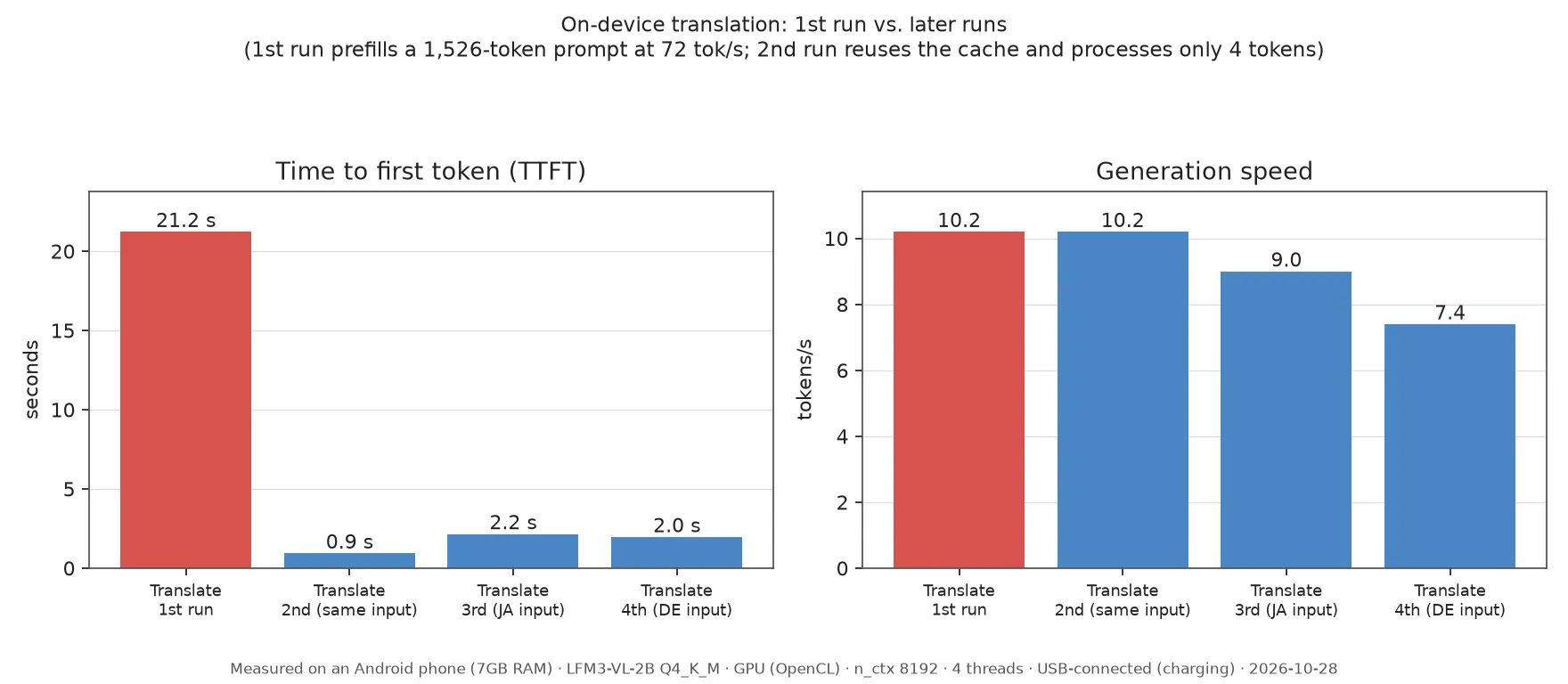
The cause was the length of the prompt. The translation prompt is 1,526 tokens, and the phone processes 72 tok/s, so reading it alone takes about 20 seconds. The second run is faster because the cache kicks in.
The prompt is nearly fixed, so prefilling it when the screen opens might shorten the wait. That is only an idea; we have not tried it yet.
Problem 2: it slows down with continued use
After a few minutes of use, heat reduces the generation speed, so later tasks wait longer.
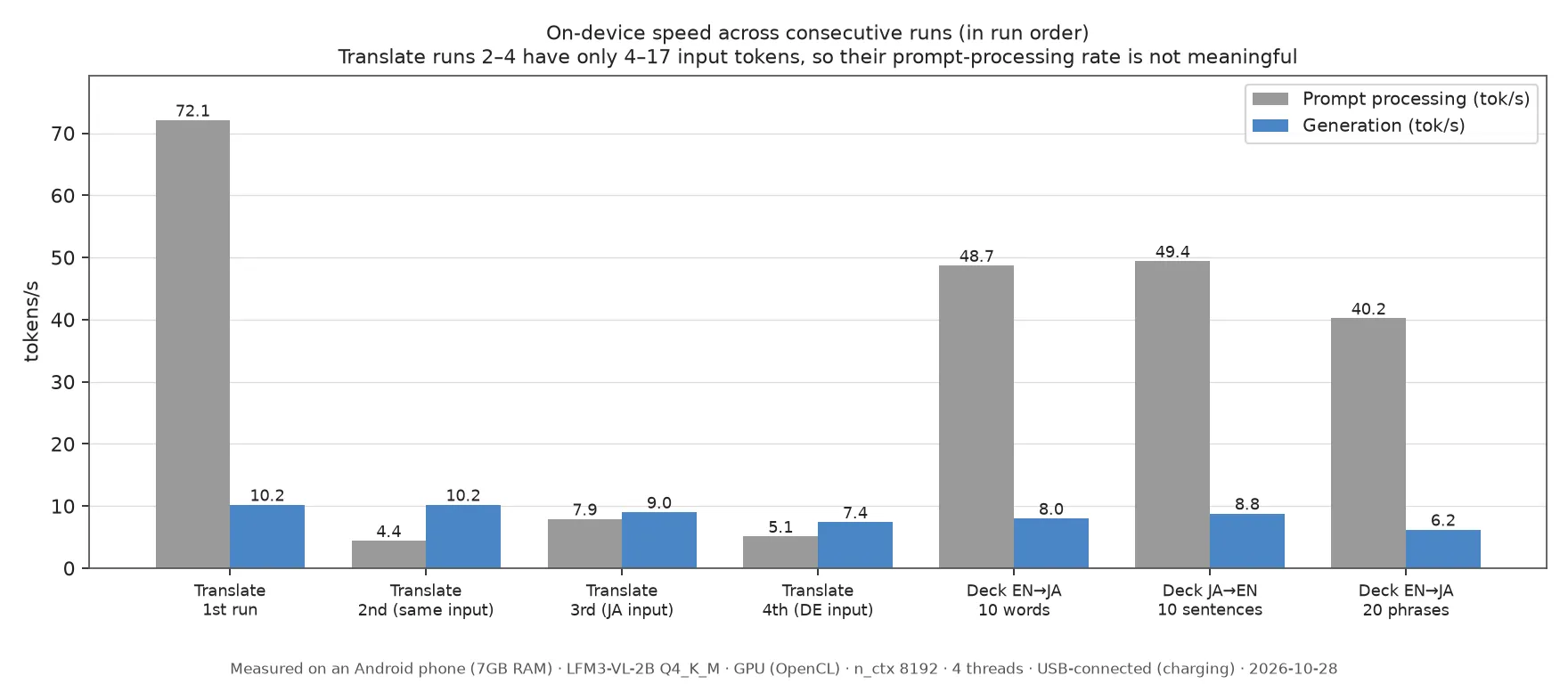
Generation speed fell from 10.2 tok/s to 6.2 tok/s. A deck of 20 phrases took 156.3 seconds, and even a deck of 10 words took 66.6 seconds.
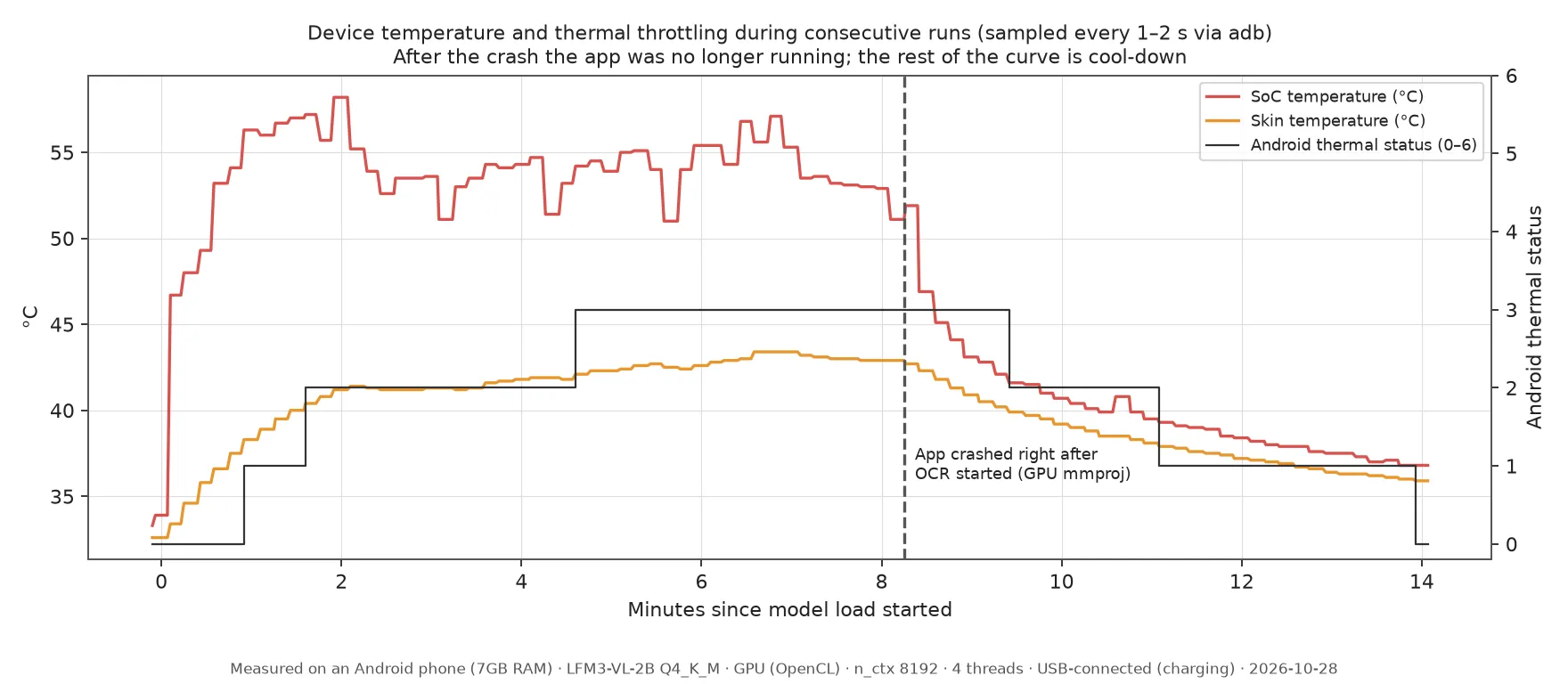
Android’s thermal status rose to 1 after about 1 minute, 2 after about 1.6 minutes, and 3 after about 4.6 minutes. The temperature falls in the second half of the graph because the app crashed during the image test that came next.
Running on CPU only
The numbers so far come from running on the GPU. On CPU only, generating a deck got faster, from 64.2 to 46.2 seconds, but memory use went up and the phone heated up sooner.
| GPU | CPU only | |
|---|---|---|
| Time to generate a 10-word deck | 64.2 s | 46.2 s |
| App memory (peak) | 1052MB | 1923MB |
| Time to thermal status 3 | About 2 min 35 s | About 1 min 35 s |
| Peak SoC temperature | 57.4℃ | 60.4℃ |
Memory is resident memory and does not include the weights placed on the GPU.
Problem 3: translations and readings are wrong
The model keeps to the JSON format, but the content has noticeable errors. That is a serious problem in a flashcard app, because learners memorize the mistakes as they are.
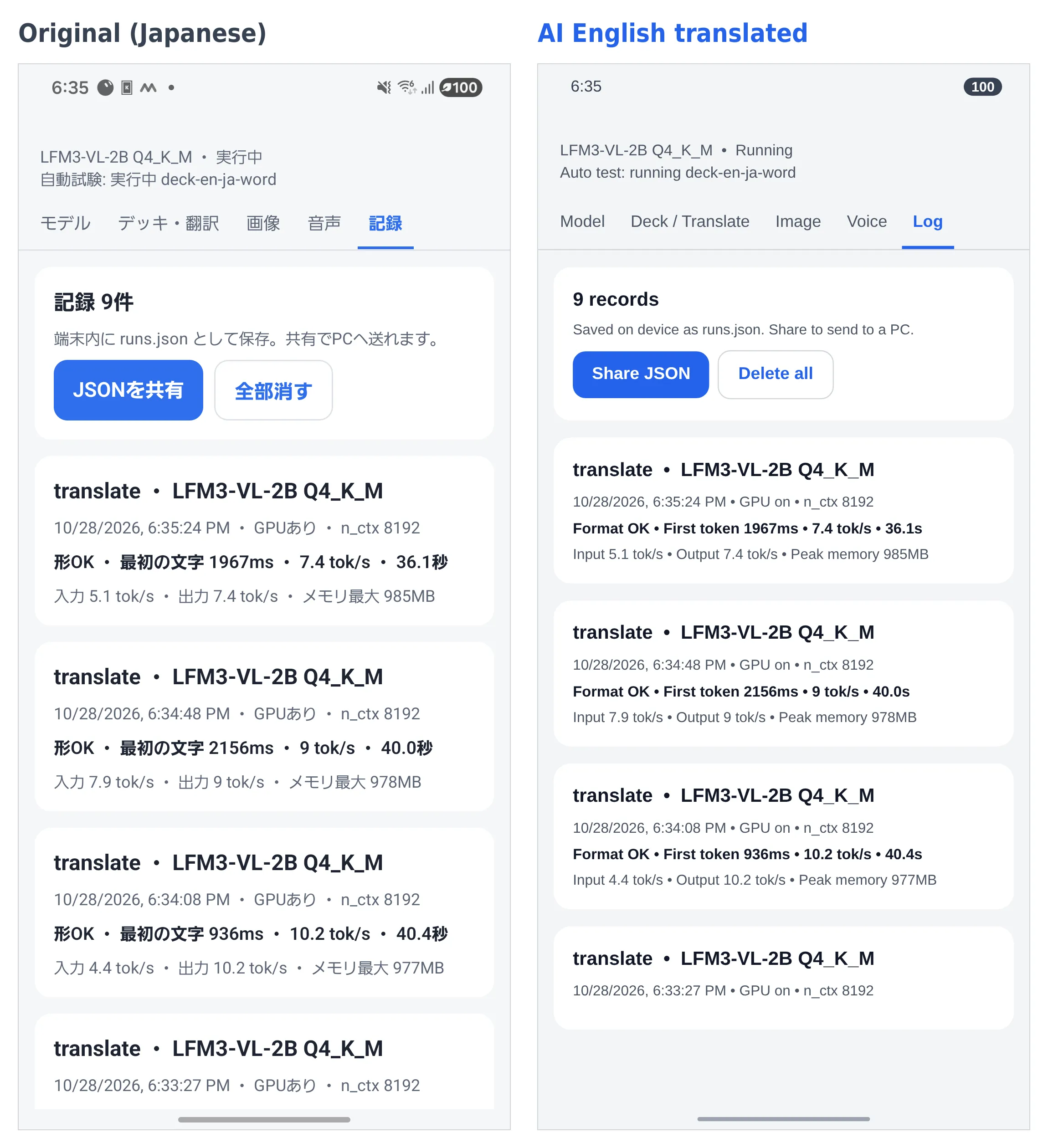
- Japanese readings were almost never correct. 空港 (airport) became
kū kōkun, and 荷物 (luggage) becamenagō. - English-to-Japanese translations sometimes stayed in romanized text instead of becoming Japanese.
- It identified the German “Ich habe Hunger” as English.
- A Korean-to-Japanese deck, tested on PC, produced only 1 card out of 10, with Japanese in the Korean field.
- Asked for 10 example sentences, it stopped at 2 cards on the GPU and 8 on CPU only.
The same mistakes appeared on PC, so we see this as a limit of the model. The model card’s intended uses are also things like reading images and documents, so translation and deck generation may simply not be its strength.
Comparison with other models
We also tried Gemma 4 E2B and Qwen3.5-2B on the phone.
| Model | Result on the phone |
|---|---|
| Gemma 4 E2B (Google, about 3.1GB) | The app was terminated during loading all 4 times |
| Qwen3.5-2B (about 1.3GB) | Runs, but translation took 577.4 s and decks produced 1 to 2 cards out of 10 |
On PC, Gemma 4 E2B had much better quality, for example reading 飛行機 (airplane) correctly as hikōki. On the phone, however, it would not load with the GPU setting. The log from the first attempt records Android terminating the app for lack of memory. We did not try the CPU-only setting.
Thinking mode
We also tried thinking mode with a limit of 1,024 tokens. It returned answers, but processing took about 3.5 to 7 times longer. A 10-word deck went from 64.2 to 257.7 seconds, and the readings were still wrong.
Problem 4: it can read text, but each image takes 20 to 80 seconds
Text recognition was the most promising of the three features. Of the 4 test images, it read every line correctly in 2. However, each image takes 20 to 80 seconds.
| Image | Lines read correctly | Time |
|---|---|---|
| English menu | 4 of 9 | 77.7 s |
| Japanese station sign | 5 of 5 | 38.4 s |
| Korean menu | 5 of 5 | 39.2 s |
| Small, blurred Japanese text | 3 of 4 | 18.6 s |
All the images were made for this test. On the English menu it dropped the price on 5 lines, and in the Japanese text it read 天ぷら as 天ぶら.
At first we ran the image-processing part on the GPU, and the app crashed from lack of memory. After moving it to the CPU, all 4 images ran to the end. But when the phone was already hot from translation and deck generation, the same English menu took 122.6 seconds.
What we learned
- Running the model on a phone is possible
- Translation and deck generation fall short on both wait time and quality
- Text recognition shows promise on quality, but the wait is long
- A larger model that has good quality on PC may not load on a phone with 7GB of RAM
Conclusion: not for LangDict
I decided that continuing to call the Gemini API gives a better user experience. With the local LLM, waits were long and translations and readings had many mistakes.
That said, I felt that being able to use it on the spot where there is no network, such as on a plane, would be a real benefit for a language-learning app.
Technical details
Notes for readers who want the technical details.
- Model: LFM3-VL-2B Q4_K_M (1.10GB) and mmproj F16 (0.38GB)
- Runtime: Expo and llama.rn. We swapped llama.cpp for a version that supports LFM3 and fixed a JSON constraint bug in llama.rn locally
- Generation settings: temperature 0.1, top_k 50, repetition penalty 1.0. The official recommendation is 1.1, but we changed it because JSON tended to stop partway
- Output format: specified with a JSON schema
- PC: RTX 2060 6GB, using llama-server and Vulkan
Sources
Checked on 2026-10-31. All speed, heat, and text recognition numbers are our own measurements.
- LiquidAI/LFM3-VL-2B (official model description)
- LiquidAI/LFM3-VL-2B-GGUF (the files we used)